
Need to find the list of customers who opted-in at checkout to receive marketing messages from you? Not a problem! Follow these quick steps;
1. Sign in to your Moshtix Control Room here
2. Click on the 'Promote' tab in your side menu bar, then click on 'Subscriber Data'
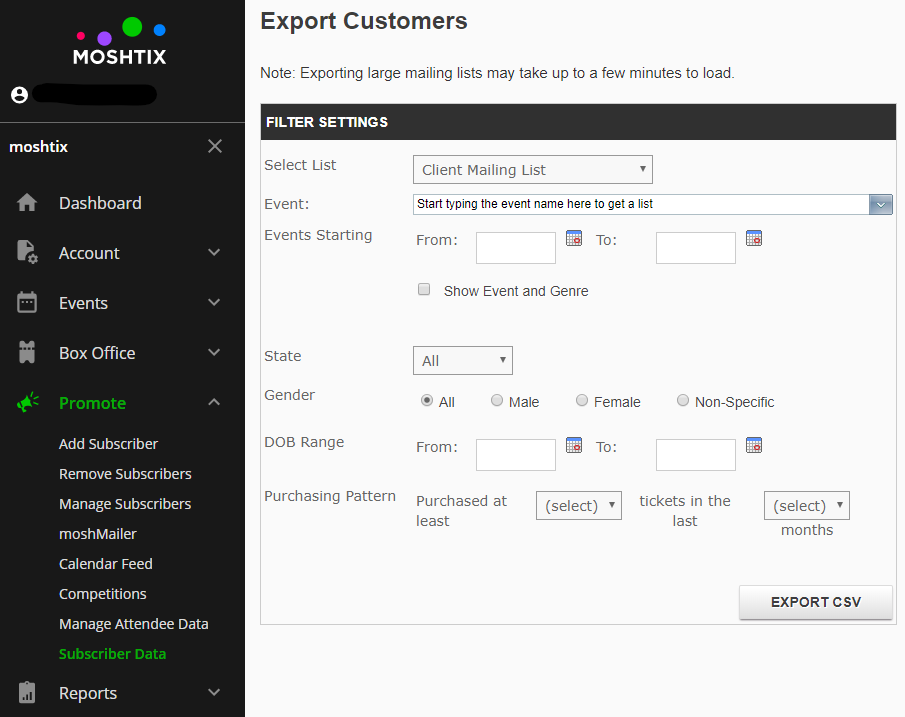
3. You can either click 'EXPORT CSV' right away to generate a list of all of your opt-ins ever, OR you can narrow it down by event, date range, or a variety of other information. You can also tick the 'Show Event and Genre' box if you download the full list and want to segment later by the event they opted-in to.
4. From there, you can upload the list into your mailing system (Mailchimp, Campaign Monitor, Active Campaign, etc) to send marketing communications or upload to Facebook Audiences to use for ad targeting.
Comments
0 comments
Please sign in to leave a comment.